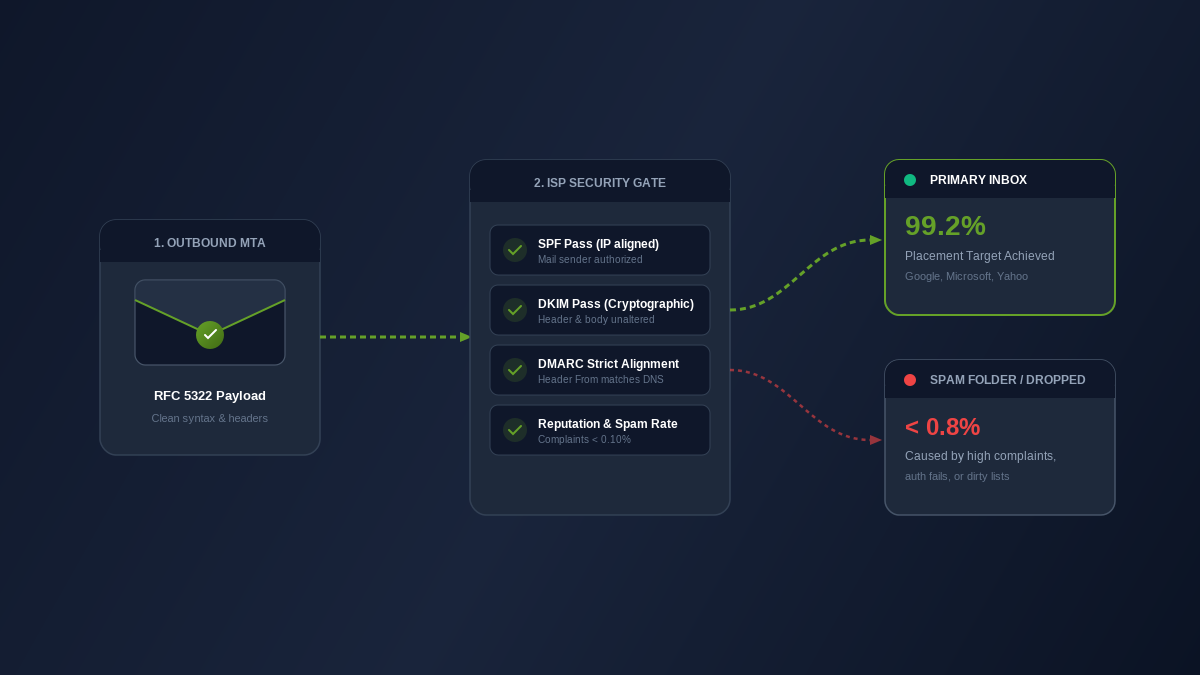
Gmail Sender Requirements: SPF, DKIM, DMARC and Best Practices
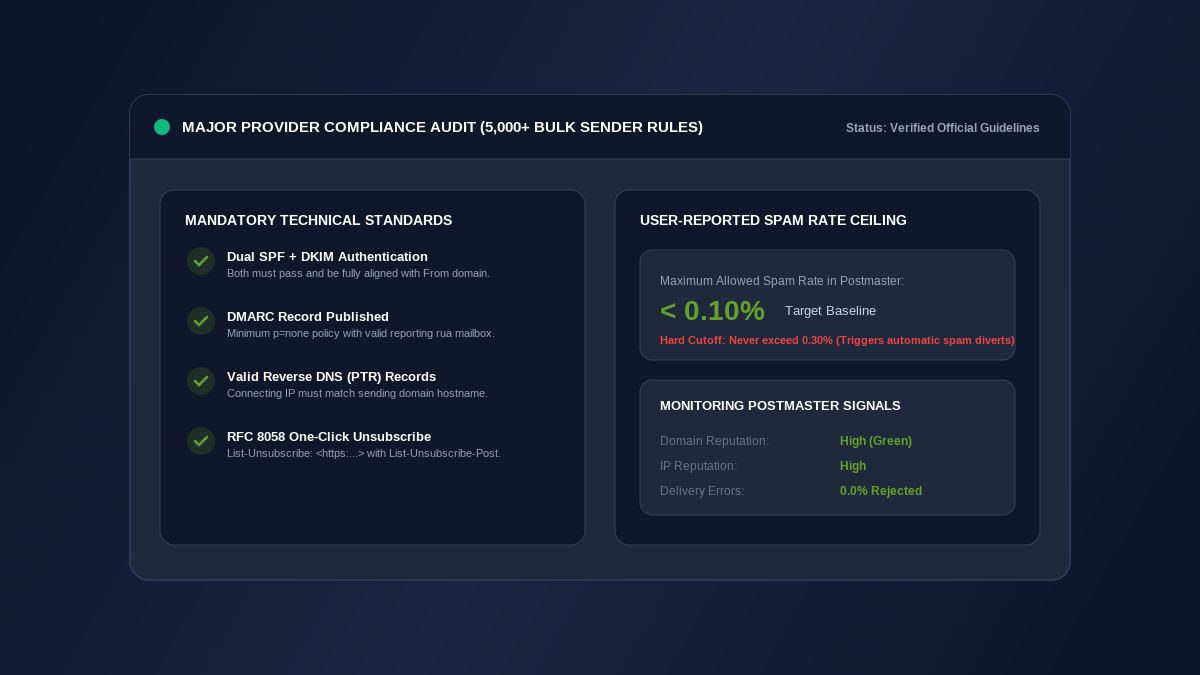
Direct Answer: Gmail sender requirements are mandatory technical and operational standards enforced by Google to eliminate spam, spoofing, and unwanted bulk mail. All senders must authenticate with SPF or DKIM, maintain valid reverse DNS (PTR), and keep spam complaint rates below 0.10%. Senders delivering 5,000 or more messages per day to personal Gmail accounts must implement both SPF and DKIM, publish a DMARC policy with aligned identifiers, and provide one-click unsubscribe headers (RFC 8058).
Last verified: March 2026 against Google's published Email Sender Guidelines. Email security thresholds and enforcement protocols are continuously audited. Always verify your current domain standing in Google Postmaster Tools.
All Senders vs. Bulk Senders (5,000+ Emails/Day)
Google categorizes outbound email streams into two tiers with distinct compliance obligations:
| Requirement | All Senders (Any Volume) | Bulk Senders (≥ 5,000 Emails/Day) |
|---|---|---|
| Authentication | Either SPF or DKIM valid | Both SPF and DKIM mandatory |
| DMARC Record | Recommended | Mandatory (minimum p=none) |
| DMARC Alignment | Recommended | Mandatory: From: domain must align with SPF or DKIM |
| Reverse DNS (PTR) | Mandatory forward & reverse match | Mandatory forward & reverse match |
| TLS Encryption | Mandatory TLS connection | Mandatory TLS connection |
| Spam Rate Ceiling | < 0.10% (Never exceed 0.30%) | Strictly < 0.10% (Never exceed 0.30%) |
| One-Click Unsubscribe | Clear unsubscribe in body | RFC 8058 headers mandatory for marketing mail |
Mandatory SPF and DKIM Authentication
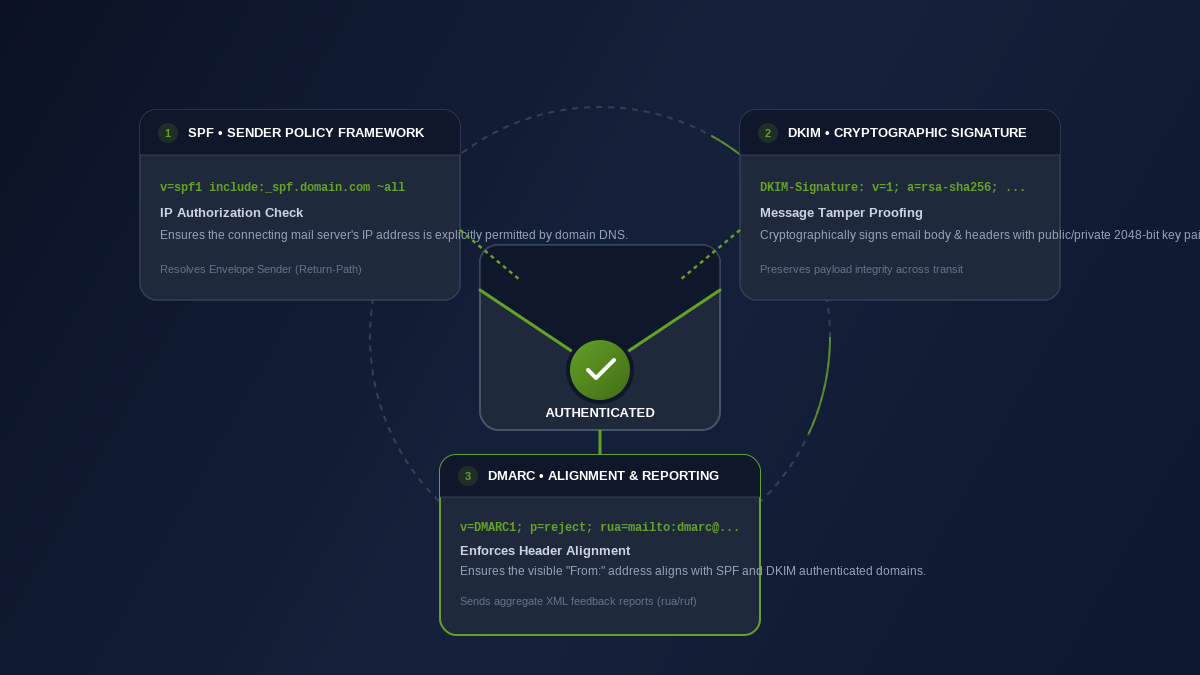
For bulk senders, relying on SPF alone or DKIM alone is no longer permitted. Google requires dual authentication:
- SPF: Authorized IPs must be declared in DNS without exceeding the 10-lookup limit.
- DKIM: All outbound messages must carry a valid DKIM signature using at least a 1024-bit key (Google strongly recommends 2048-bit RSA keys for cryptographic security).
DMARC Policy and Identifier Alignment
Bulk senders must publish a DMARC policy in public DNS. The minimum compliant policy is:
v=DMARC1; p=none; rua=mailto:[email protected]Crucially, Google verifies DMARC alignment: the domain displayed in the human-facing From: header must align with either the domain authenticated by SPF (the Return-Path) or the domain signing the message via DKIM (the d= tag). For detailed configuration steps, read SPF, DKIM, and DMARC Explained.
Valid Reverse DNS (PTR) and TLS Encryption
Every sending server IP address must possess a matching PTR record (Reverse DNS) that resolves to an authoritative hostname. When Google looks up that hostname, it must resolve back to the same IP address (Forward-Confirmed Reverse DNS, or FCrDNS). Furthermore, SMTP transactions must use Transport Layer Security (TLS 1.2 or TLS 1.3) during transmission.
The Spam Rate Ceiling: 0.10% Target vs. 0.30% Limit
Google measures the user-reported spam rate in Google Postmaster Tools. This is calculated as the ratio of user spam reports to total delivered messages to active inboxes:
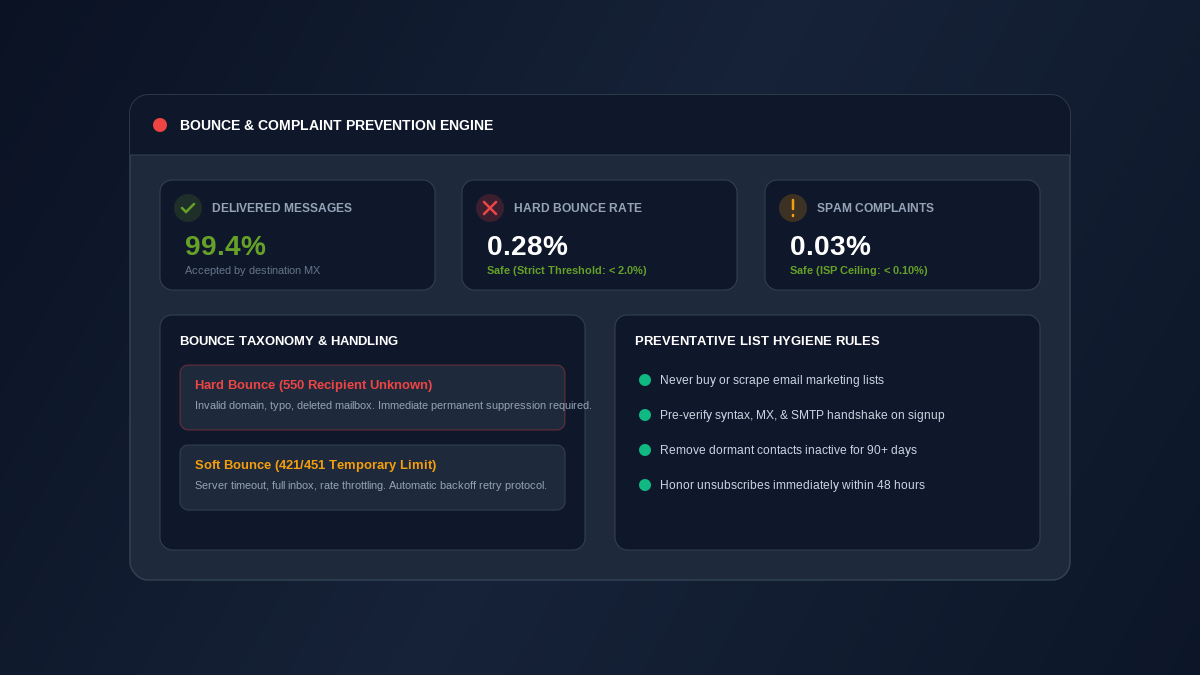
- Target Baseline: Keep your spam rate strictly below 0.10% (less than 1 spam complaint per 1,000 delivered emails).
- Enforcement Threshold: If your spam rate reaches or exceeds 0.30% (3 complaints per 1,000 sent), Google will automatically apply domain-level filtering penalties, diverting future campaigns directly to the Spam folder.
To keep spam complaints low, clean your lists regularly and prevent stale data from generating friction. Learn more in Email Bounce Rate and Spam Complaints.
RFC 8058 One-Click Unsubscribe Requirement
For subscribed marketing, promotional, and newsletter emails, senders must provide an effortless, instantaneous way to opt out. Google mandates support for RFC 8058:
List-Unsubscribe: <https://company.com/unsubscribe/token123>, <mailto:[email protected]>
List-Unsubscribe-Post: List-Unsubscribe=One-Click
When present, Gmail renders a prominent "Unsubscribe" button next to the sender's name at the top of the message. Clicking this button sends an automated POST request without requiring the user to navigate through complex landing pages. Unsubscribe requests must be honored within 48 hours.
Configuring Google Postmaster Tools
All senders should configure Google Postmaster Tools to gain visibility into delivery performance:
- Sign in to Google Postmaster Tools with your administrator Google account.
- Add your sending domain and copy the unique verification TXT record.
- Publish the TXT record in your DNS provider and click "Verify".
- Monitor the Domain Reputation, IP Reputation, Spam Rate, and DMARC dashboards weekly.
Updated Gmail Compliance Checklist
- ✓ Dual authentication configured: valid SPF and 2048-bit DKIM.
- ✓ DMARC record published at
_dmarc.yourdomain.comwith activerua=mailbox. - ✓ From header aligns with DKIM signing domain (
d=yourdomain.com). - ✓ Forward-confirmed reverse DNS (PTR) verified on outbound mail servers.
- ✓ All SMTP connections use TLS 1.2 or TLS 1.3.
- ✓ User-reported spam rate monitored below 0.10% in Postmaster Tools.
- ✓ RFC 8058 one-click unsubscribe headers embedded in all marketing messages.
- ✓ Lists pre-cleaned to eliminate hard bounces and dormant mailboxes.
Audit Your Email Deliverability Compliance
Protect your Gmail inbox placement before sending your next campaign. Verify your recipient database for syntax errors, spam traps, and dead mailboxes with Emails Verification.
Start Free Email Verification (100 Credits) ➔Frequently Asked Questions
Does the 5,000 email per day threshold apply to Google Workspace domains or personal Gmail?
Google's bulk sender guidelines apply to senders dispatching 5,000 or more emails in a 24-hour window to personal Gmail accounts (@gmail.com and @googlemail.com). However, Google recommends that all senders follow these best practices, as corporate Google Workspace domains frequently enforce equivalent security policies.
What happens if my spam rate in Google Postmaster Tools exceeds 0.30%?
If your user-reported spam rate in Google Postmaster Tools exceeds 0.30%, Google's automated filtering systems will immediately divert your outgoing messages away from the primary inbox into the Spam folder. You cannot appeal this manually; you must lower complaints below 0.10% over several consecutive weeks to recover.
Does an unsubscribe link in my email body satisfy the one-click unsubscribe requirement?
No. For subscribed marketing and commercial messages, Google specifically mandates RFC 8058 compliant email headers: both 'List-Unsubscribe: <https:...>' and 'List-Unsubscribe-Post: List-Unsubscribe=One-Click'. This allows Gmail's web and mobile apps to display an automated 'Unsubscribe' button at the top of the interface.